
I used to treat cleaning as the last five minutes of list building. I pulled the rows and sent the mail. Then the replies came back wrong. The same firm answered twice. Cleaning is not the last five minutes. It is the job that makes the list worth sending.
Short answer: how to clean Google Maps lead list: remove exact duplicates on phone and email, catching near duplicates on name and address, dropping chains and wrong-fit rows, removing role addresses and typo domains, and running an MX check on each email before you send. Then you audit a random sample and fix what the audit finds.
What does a clean lead list actually look like?
A clean list has one row per firm. Each row has a name you can trust, a phone that reaches that firm, and an email that belongs to a real inbox at that firm. Every row fits the trade and the area you chose.
I keep four labels while I clean: keep, merge, fix, and drop. Keep means the row is ready. Merge means a second row holds part of the same firm. Fix means the row has a small fault I can repair. Drop means the row leaves the file. Every row gets one label. Unchecked rows do not get sent.
Where do duplicates come from in a Maps list?
Duplicates start with the way Maps returns results. A single search tops out near 120 results, so a big area needs more than one search, and each search can return the same firm again. Split a city by neighbourhood and the firm on the border shows up twice. Search two close categories and the same firm shows up in both.
Chains add a second source. A firm with three branches has three listings, and each can carry the same phone and website. A firm that moved has an old listing and a new one. A spelling variant, "Co." in one row and "Company" in the next, looks like two firms to a plain sort. Dedupe is not untouched on this blog. The cold-calling post already covers a short dedupe pass, and the GMB scraper post covers dedupe across searches. This post covers the full cleaning job.
| Dedupe pass | What it catches | How you run it |
|---|---|---|
| Exact | Same phone, same email, same name and address | Sheets Remove Duplicates on those columns |
| Fuzzy | Name variants, close addresses, same domain with a different local part | Sort and eyeball, or a fuzzy match add-on near 90 percent, per Redscraper |
How do you remove exact duplicates in Sheets?
Copy the raw export to a backup tab first and name it Raw, so you can always go back. Never clean the only copy. Then standardize the fields: lower case for emails and domains, title case for names, one phone format with the country code, and no stray spaces. A space after an email address is enough to hide a duplicate.
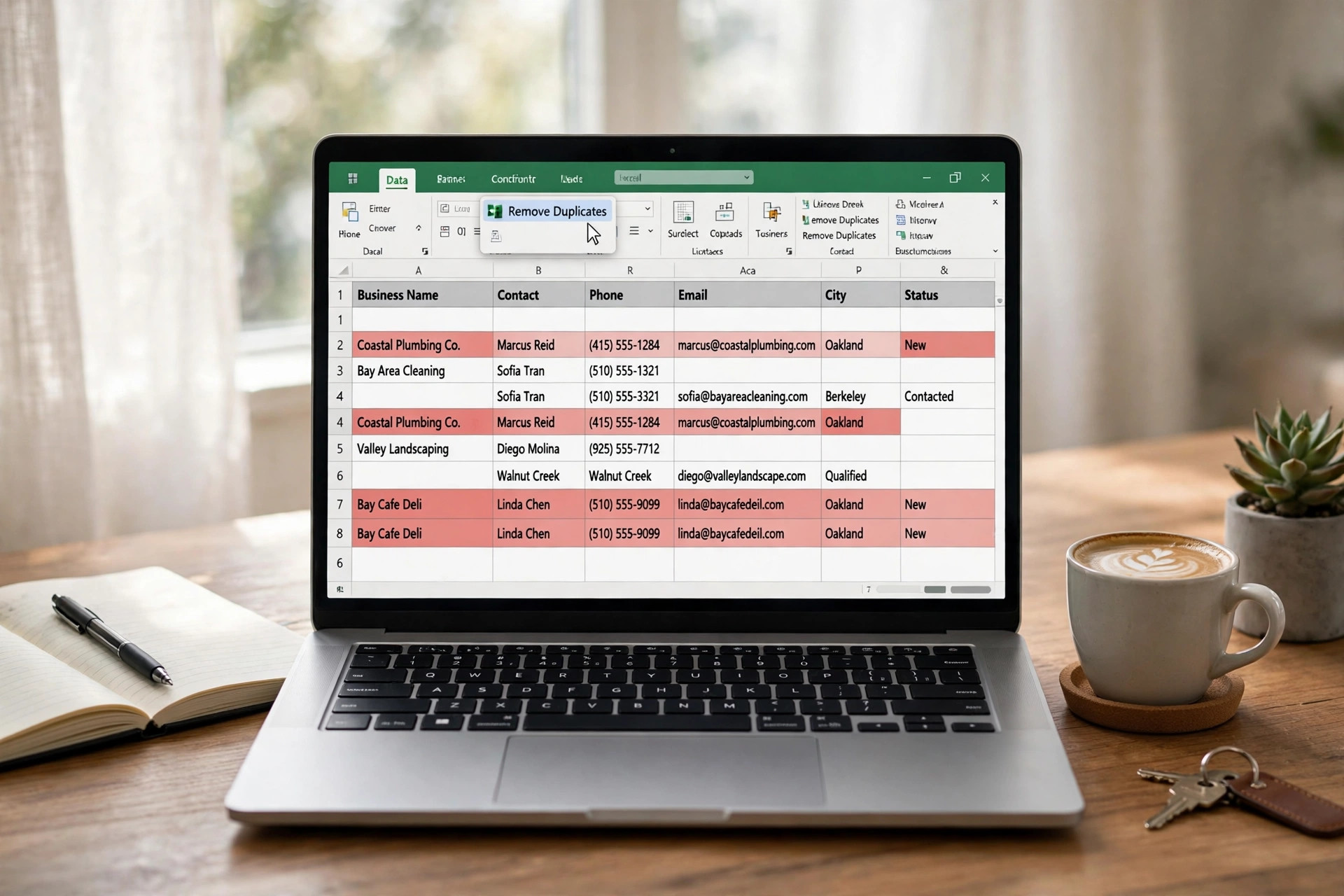
Then run Remove Duplicates three times. First on phone: a shared number usually means a shared firm. Then on email: a shared inbox means the same firm too. Then on name plus address, to catch firms with a second number for a second branch. In Sheets the path is Data, then Data cleanup, then Remove duplicates.
Merge before you delete. Combine two rows for one firm into a single fuller record. Delete the weaker row only after the merge, so nothing gets lost.
How do you catch fuzzy duplicates that exact matching misses?
Fuzzy duplicates are rows that look different and mean the same firm. "Coastal Plumbing Co." in one row and "Coastal Plumbing Company" in the next. The same phone under two name spellings. The same domain with marcus@ in one row and m.reid@ in the next. Exact matching walks straight past all of them.
I sort by domain first, then by phone, then by street number. For a larger file, Redscraper points to OpenRefine, free, and Deduply, for HubSpot and Salesforce users, and suggests a similarity cutoff near 90 percent.
Flagged pairs go to manual review, never to an auto-merge. Two firms can share a name in the same city. When you merge, keep the row with the checked email and the fuller address, and log the merge in your notes column.
How do you filter out chains, franchises, and wrong-fit rows?
Sort by website domain and the chains show themselves. One domain across ten rows is a chain or a franchise group, and you need a rule for it before you send. If you sell per branch, keep one row per branch. If you sell to head office, keep one row for the firm.
Then filter by fit. A search for plumbers will still pull a plumbing supply shop, a trade school, and a firm that closed last year. Read the category column and drop anything outside the trade you chose. A dead website or a "permanently closed" note is enough to drop the row.
How do you remove role addresses and typo domains?
Role addresses are the shared inboxes: info@, support@, admin@, sales@, contact@. They reach a queue, not a person, and a mail to a queue is easy to ignore. I drop them when a personal address exists for the same firm. I keep one only when the firm is a strong fit and no personal address exists anywhere. The email finding guide covers how to find a personal address from a business website.
Typo domains are the quieter fault. Gmal.com, hotmal.com, a missing letter in the firm name, a .con where a .com should be. Sort by domain and read the tail of the list, where the odd spellings gather. Compare each email domain against the website domain on the same row. Fix the typo when you can prove the right spelling. Drop the row when you cannot.
What is the difference between an MX check and SMTP verification?
| Check | What it asks | What a pass means |
|---|---|---|
| MX check | Does this domain publish mail server records | The domain can receive mail |
| SMTP verification | Will this server accept mail for this address | The address looks deliverable right now |
An MX check proves the domain can receive mail. It does not prove a mailbox exists. That limit matters, because a pass can still bounce when the mailbox is gone or full. GoLeads Pro runs an MX check on each address before export, per the vendor, and that check carries the same limit. The accuracy post covers fill rates, so this post does not redo those numbers.
SMTP verification goes a step further and asks the receiving server about the address itself. Some servers answer plainly. Others accept every address and sort out the bad ones later. Axvoid Tools explains the split in its guide to bulk email checks, updated 2026-10-13. Run the MX check on every row, and treat a pass as a green light, not a guarantee.
A worked example: plumbers in Oakland, from raw pull to clean file
Take a teaching sample, not a real pull. Say you pull plumbers in Oakland and the raw file holds 240 rows. These counts show the shape of the work, not results from a real pull.
First, back the file up and standardize the fields. Remove Duplicates on phone takes out 18 rows. On email, 7 more leave. On name plus address, 5 more leave. The file now holds 210 rows.
Next, sort by domain and read the near matches. "Coastal Plumbing Co." and "Coastal Plumbing Company" share a phone, so they merge. A second firm shares a name but sits at a different address with a different phone, so it stays. The fuzzy pass merges 12 rows. The chain filter finds one national chain with 6 branches, and you keep the 2 inside your area. The role pass drops 9 rows, the typo pass fixes 4 domains and drops 2 more, and the MX check fails 14.
The file now holds 179 rows: one firm each, inside the area, with a checked email and a phone. Write both counts down, 240 raw and 179 clean.
Which mistakes ruin a cleaned list?
Deleting before merging is the first mistake. Two rows for one firm hold different fields, and deleting one loses what the other row carried. Fix it by merging first and deleting second, every time.
Deduping on name alone is the second mistake. The same firm can carry two spellings, and two firms can share one name in the same city. Fix it by deduping on phone first, then email, then name plus address.
Trusting an MX pass as proof is the third mistake. A domain that can receive mail can still hold a dead mailbox. Fix it by auditing a random sample after the checks.
Cleaning once and never again is the fourth mistake. Data ages, and Redscraper puts yearly data decay at 20 to 30 percent. A list that was clean in January is not clean in July. Fix it by re-checking the active rows each month.
Sending the raw file to the CRM is the fifth mistake. A CRM full of duplicates creates duplicate outreach. Redscraper says the same: clean before you import, never after.
How do you run the before and after quality audit?
PhantomBuster suggests a plain audit: pull 200 random leads, check five areas, names and titles, company name and domain, email checks, duplicate records, and outdated rows. If more than 10 to 15 percent of the sample fails those checks, the list needs work before outreach. That 10 to 15 percent line is their rule, not a law of nature. I use it as a tripwire, not a verdict.
Run the audit twice: once on the raw file, so you know how bad the pull was, and once on the cleaned file, so you know the cleaning worked. Write both failure counts down beside the file. If the cleaned file still fails above that line, the cleaning missed a pass, and you run the pass again instead of sending.
How does cleaning connect to accuracy and email finding?
This post does not redo the accuracy post or the email finding post. Fill rates live in the accuracy post. Finding a personal address from a website lives in the email finding post. Cleaning sits between them: pull, find the addresses, clean the file, then send. The cold-calling post shows the short dedupe pass for a calling day, and the export post covers moving the finished file into Excel and Sheets.
Checklist: clean a Maps lead list before you send
- Back up the raw file, then standardize case, phone format, and stray spaces.
- Remove exact duplicates on phone, then email, then name plus address, merging before you delete.
- Sort by domain, phone, and street number to catch fuzzy duplicates, and review flagged pairs.
- Apply your chain rule, and drop wrong-fit rows and firms outside your area.
- Drop role addresses where a personal address exists, and fix or drop typo domains.
- Run an MX check on every email. A pass does not prove a mailbox exists.
- Audit 200 random rows before and after cleaning.
Frequently asked questions
How long does it take to clean a Google Maps lead list?
A list of a few hundred rows takes an hour or two by hand in Sheets. The exact dedupe runs in minutes, while the fuzzy pass and the manual review take most of the time. Larger files go faster with OpenRefine or a fuzzy match add-on, but the review step stays manual.
Should I dedupe on name, phone, or email?
Dedupe on phone first, then email, then name plus address, in that order. A shared phone or a shared email means a shared firm even when the name spelling differs. Name alone misleads both ways: one firm can carry two spellings, and two firms can share one name in the same city.
What is a fuzzy duplicate?
A fuzzy duplicate is a row that means the same firm but does not match exactly. "Coastal Plumbing Co." and "Coastal Plumbing Company" with the same phone are one firm, and so are two rows with the same domain and a different local part in the email. Redscraper suggests a similarity cutoff near 90 percent, and flagged pairs need manual review.
Should I remove role addresses like info@?
Drop a role address when a personal address exists for the same firm, because a shared inbox is easy to ignore. Keep one only when the firm is a strong fit and no personal address exists anywhere, and mark it as a role address so you know what you sent.
Does an MX check prove an email address is real?
No. An MX check proves only that the domain publishes mail server records and can receive mail. It does not prove a mailbox exists for that address, and a pass can still bounce when the mailbox is gone or full. GoLeads Pro runs an MX check on each address before export, per the vendor.
How often should I re-clean a lead list?
Re-check the active rows each month and re-run the full cleaning pass each quarter. Data ages fast, and Redscraper puts yearly data decay at 20 to 30 percent, so a list that was clean in January will hold dead rows by July. PhantomBuster suggests a weekly check on new data and a monthly audit of the full database.
Do I clean before or after I import to my CRM?
Clean before you import, every time. A CRM full of duplicates creates duplicate outreach, and duplicate outreach annoys the same firm twice. Redscraper says the same in its guide: do not upload raw data into your CRM, clean first. Keep the raw file in Sheets as your backup.
What do I do with rows I cannot fix?
Drop them. A row with a typo domain you cannot prove, a dead website, or an email that fails its MX check is a row that will bounce or confuse the firm. Move it to a separate research tab if the firm looks like a strong fit, so you can check it again later.
Pull your next list, run the passes in order, and audit the result before you send. Get the GoLeads Pro extension and start from the search you already ran.